What Is Nesting? True-Shape Cutting Optimization
Nesting is how you arrange parts on a sheet of material so the whole job is cut from the fewest sheets. When the parts are irregular shapes — not simple rectangles — nesting is what lets them interlock and share space, which is where the real material savings come from.
What is nesting?
Imagine you have to cut fifty irregular brackets out of steel sheet. Lay them out in a neat grid and each one sits inside its own rectangle, with the empty space around its curves and notches going straight to the scrap bin. Nesting instead treats each part as its real outline and slots parts into the gaps left by their neighbours — a triangle tucked under the arm of an L, a small piece filling the notch of a big one. The goal is always the same: place every part, using as few sheets as possible.
It is the sheet-cutting version of packing a suitcase well. And like packing a suitcase, the shape of what you are packing is the whole point.
Nesting vs. guillotine cutting
There are two fundamentally different ways to cut a sheet, and they suit different machines.
- Guillotine cutting makes straight cuts that run edge to edge. Every cut crosses the whole board (or the whole strip left by an earlier cut), so parts end up as a grid of rectangles. This is what a panel saw does, and it is the right model for panels, boards, glass and bars. Our guillotine vs. free cutting guide goes deeper on the trade-off.
- Nesting (also called free-form or true-shape cutting) places arbitrary polygons and lets them overlap into each other’s concave pockets. It fits more onto a sheet, but the layout is not producible on a panel saw — you need a machine that can follow any path.
Neither is “better” in the abstract. If your parts are rectangles, a guillotine layout is faster to produce and just as efficient. If your parts are shaped, nesting is the only thing that recovers the wasted air.
Why true shape matters
The reason nesting saves material is easiest to see by comparing it with the honest rectangular alternative: give every part its bounding box (the smallest rectangle that contains it) and pack those.
On a representative job of 272 irregular parts on a standard sheet, a true-shape nest used 6 sheets. The exact same parts, packed by their bounding boxes, needed 9 — a third more material, purely because the bounding box counts the empty space around each shape as solid.
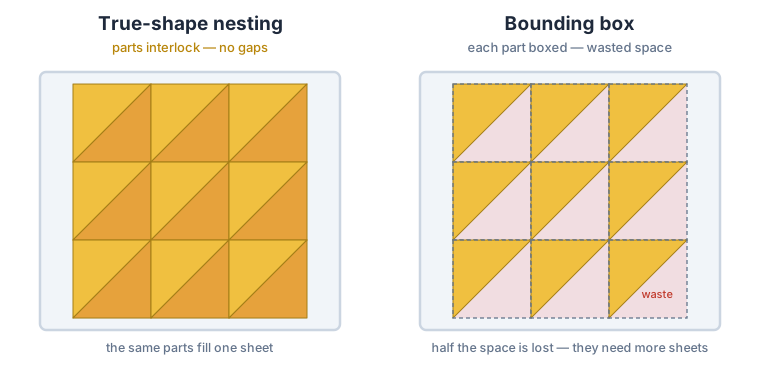
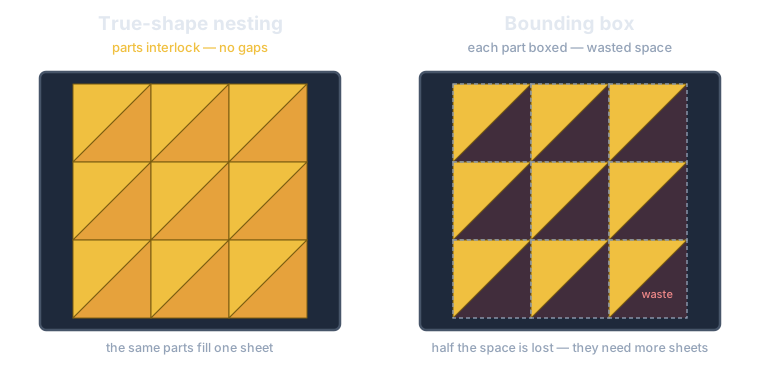
That also explains a common trap: a bounding-box packer’s “density” or “yield” percentage can read higher for a worse result, because it counts that notch-air as filled. The only number that compares fairly between the two is the sheet count for the same physical parts. You can see the measured comparison on our benchmarks page.
How nesting software works
A rectangular optimizer only has to reason about widths and heights. A nesting engine works with geometry: it takes each part’s outline as a polygon, tries it in different rotations, and searches for a position where the part does not overlap any part already placed, nor the edge of the sheet, nor any exclusion zone. Because the shapes are arbitrary, the number of ways to arrange them is astronomical, so the engine uses a geometric heuristic — a fast collision test plus a placement strategy — rather than checking every combination.
Two properties separate a production-grade nester from a toy. The first is determinism: the same input should always produce the same nest, so you can quote from it, cache it, and reproduce a job months later. The second is that it reports the honest metric — the number of sheets the physical parts actually need — rather than a density figure that flatters bounding-box air. CutOptim’s standard engine is built on both: a deterministic, seeded search, and sheet-count reporting. Its optional longer search trades the determinism for a time-limited hunt for a denser nest, and never returns more sheets than the standard engine.
Which industries use nesting?
Nesting matters wherever parts are irregular and material is expensive. The common ones:
- Laser cutting — sheet metal, acrylic, wood, and more; the laser follows any contour, so nesting is standard.
- Plasma cutting — thicker steel plate for structural and machine parts.
- Waterjet cutting — stone, glass, metal and composites, where the jet cuts any shape cold.
- Sheet-metal fabrication — brackets, enclosures, chassis parts punched or cut from coil and sheet.
- Textile and apparel — pattern pieces nested on fabric rolls, where a percentage point of yield is a large cost.
- Leather goods — hides are irregular and have defects to avoid, so nesting with exclusion zones is essential.
- Gaskets and seals — rings and shaped profiles die-cut or waterjet-cut from rubber and composite sheet.
- Glass — shaped panes for furniture, appliances and architecture.
- Sign-making — cut letters and shapes from acrylic, aluminium composite and vinyl.
- Packaging and die-cutting — carton and label shapes nested on board and film.
If instead you cut panels, boards or bars to size, that is a rectangular job — a cutting-stock problem best solved with a guillotine layout, and you can try it in the board cutting calculator.
Exclusion zones: cutting around defects
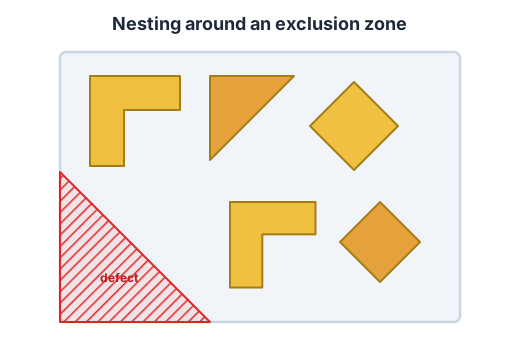
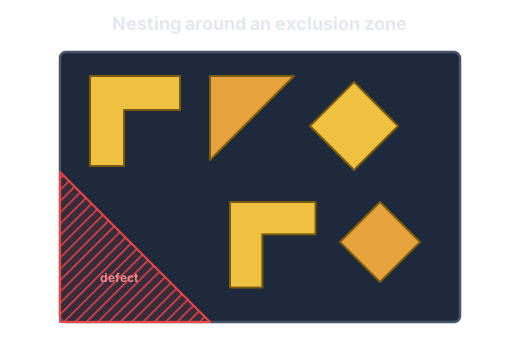
Real material is rarely perfect. A hide has scars, a steel sheet has a scratch or a pre-printed corner, a fixture needs a clamp somewhere on the bed. A good nesting engine lets you mark those as exclusion zones — regions where no part may be placed — so the nest works around them automatically. This is something a plain rectangular optimizer cannot express, and it is one of the biggest practical reasons shops reach for true-shape nesting.
Nesting with CutOptim
CutOptim does true-shape nesting in two places. In the web app, the optimizer has a dedicated Nesting mode: import your part outlines as SVG or DXF, nest irregular polygons onto sheets, mark exclusion zones for defects or clamps, and export the layout as SVG, DXF, PDF or Excel — for laser, plasma and waterjet work. And on the CutOptim Engine API, the same engine is callable over HTTP for developers, ERP systems and machine software.
A part is a polygon (with optional interior holes), stock sheets can carry exclusion zones, and each placed part gets its position and rotation. The standard engine is deterministic — the same parts always produce the same nest, so you can cache it, audit it and reproduce last year’s job. Formats, both engines, prices and code samples are on the nesting API page. The full API request and response shape is in the API reference.
For shop work the nest also takes the settings that change what a job costs. The gap between parts and the clearance to the sheet edge are set separately, for example 5 mm between parts and 10 mm at a clamped edge. You can offer several sheet sizes: the nest compares them regardless of the order you list them in and can mix them, such as full sheets plus a smaller last one. Each result reports the sheets used per size, any parts that did not fit, and the cut length and pierce count for estimating machine time. On the API, a longer search runs as a background job for denser nests and never returns more sheets than the standard engine. How to turn all this into a price is in how to quote laser-cut parts.
Frequently asked questions
What is nesting in cutting?
What is the difference between nesting and guillotine cutting?
Which industries use nesting?
Does nesting reduce material waste?
Can nesting avoid defects or clamps on a sheet?
Does CutOptim do true-shape nesting?
Related
Ready to optimize your cuts?
2 free runs without an account, then 3 a month with a free account
Open App