Linear Cutting Calculator - Optimize 1D Bar & Pipe Cuts
Free linear cutting calculator for bars, pipes, profiles, and extrusions. Minimize material waste with optimized 1D cutting patterns for any stock length.
Updated: March 1, 2026
Free to use — no signup required
What is a Linear Cutting Calculator?
A linear cutting calculator optimizes how you cut pieces from stock-length bars, pipes, profiles, or any material sold by length. You enter your available stock lengths and the list of cut pieces you need, and the tool finds the combination that uses the fewest stock pieces with the least leftover scrap.
This is the classic one-dimensional (1D) cutting stock problem. It appears in metalworking (steel bars, aluminum extrusions), plumbing (copper and PVC pipes), construction (conduit, rebar, trim molding), and woodworking (battens, rails, dowels). Without optimization, workers typically cut pieces in the order they appear on the list, which wastes 15–30 % of the stock. A 1D optimizer rearranges the pieces across stock bars to bring waste below 5 % in most cases.
CutOptim provides a free online 1D optimizer that handles multiple stock lengths, blade kerf, minimum remnant settings, and exports labeled cutting diagrams as PDF or CSV.
How to Use This Linear Cutting Calculator
Enter your stock lengths
Add the lengths of bars, pipes, or profiles you have available. You can mix different stock lengths — for example, 6000 mm standard bars plus a 3500 mm leftover from a previous job.
Add required cut pieces
Enter the length and quantity of each piece you need. Give each piece a label (e.g., “Top rail”, “Side post”) so the cutting diagram is easy to follow in the workshop.
Set kerf and remnant threshold
Enter the blade kerf width (e.g., 2 mm for a metal chop saw, 3 mm for a miter saw). Set the minimum remnant length you want to keep — shorter leftovers are counted as waste.
Optimize and review
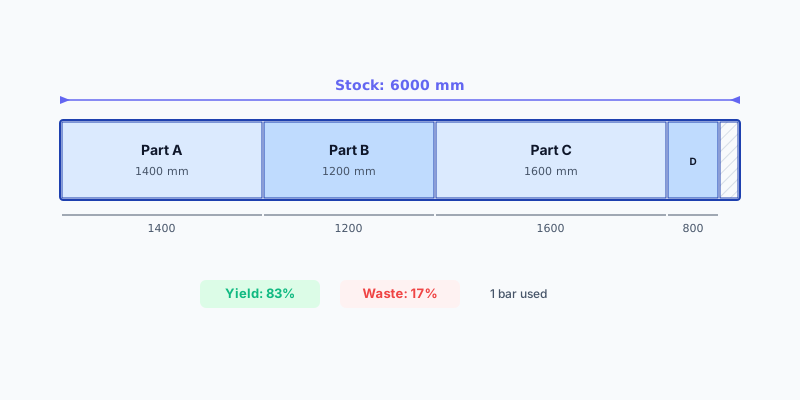
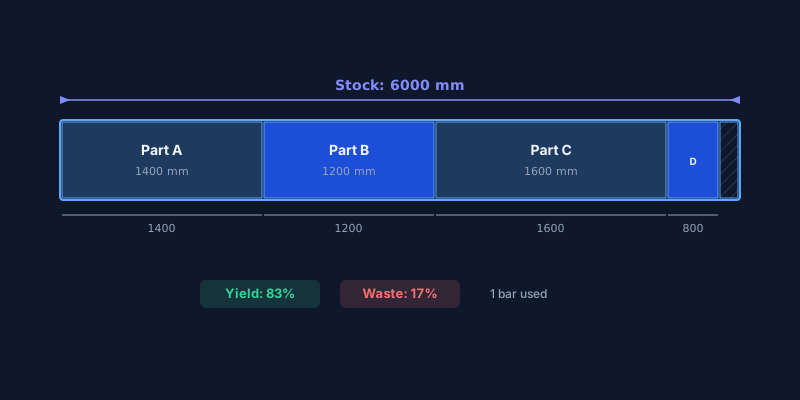
Click optimize. The algorithm assigns pieces to stock bars to minimize total waste. Review the visual bar chart showing which pieces come from each stock bar and the overall waste percentage.
Export the cutting plan
Download the plan as a PDF with labeled bar diagrams, or as a CSV summary listing each stock bar with its assigned cuts. Pro users can brand the PDF with their company logo.
Standard Stock Lengths
Material Presets
EU| Material | Standard Sizes |
|---|---|
| Steel bar / tube | 6000 mm6500 mm12000 mm |
| Aluminum profile | 6000 mm6500 mm5000 mm |
| Copper pipe | 5000 mm3000 mm |
| PVC conduit | 3000 mm4000 mm6000 mm |
| Wooden batten / molding | 2400 mm3000 mm4000 mm6000 mm |
Technical Specifications
Common Use Cases
Steel and metal fabrication — Cutting steel bars, angle iron, and hollow sections for structural frames, railings, and gates. Optimizing across 6-meter stock lengths reduces scrap that is difficult and expensive to dispose of.
Aluminum window and door frames — Profile sections for windows and sliding doors come in 6–6.5 m lengths. A linear optimizer ensures maximum yield when cutting frame components of varying sizes for an entire building order.
Plumbing and HVAC — Copper, PEX, and PVC pipes are cut to length on site. Running the cut list through an optimizer before starting tells the plumber exactly how many pipes to bring, avoiding return trips to the supplier.
Trim and molding installation — Baseboards, crown molding, and door casing come in fixed lengths. An optimizer packs cuts across the available pieces, reducing trips to the hardware store and cutting waste on expensive hardwood trim.
waste reduction
Tips for Best Results
Set a realistic minimum remnant length. Keeping remnants shorter than 200 mm is rarely worthwhile — they take up storage and are hard to use in future projects. Setting the threshold to 200–300 mm keeps your workshop organized.
- Include leftovers from previous jobs. Add them as extra stock with their actual measured lengths. The optimizer uses them before cutting into new full-length bars.
- Account for blade kerf accurately. A metal chop saw typically removes 1.5–2.5 mm per cut, while a wood miter saw takes 3 mm. Incorrect kerf values lead to the last piece on a bar not fitting.
- Group by material cross-section. Run separate optimizations for 40 × 40 mm steel square tube and 20 × 20 mm angle. Mixing cross-sections in one run produces unusable diagrams.
- Check for quantity adjustments. If the optimizer shows a bar with only one short piece and the rest wasted, consider whether that piece can share a bar with a different project to reduce total stock usage.