Panel Cutting Optimizer - Minimize Sheet Material Waste
Free panel cutting optimizer to arrange parts on sheet materials. Reduce waste on plywood, MDF, particleboard, and melamine with smart nesting algorithms.
Updated: March 1, 2026
Free to use — no signup required
Furniture Makers: Your Panel Waste Is Eating Your Margins
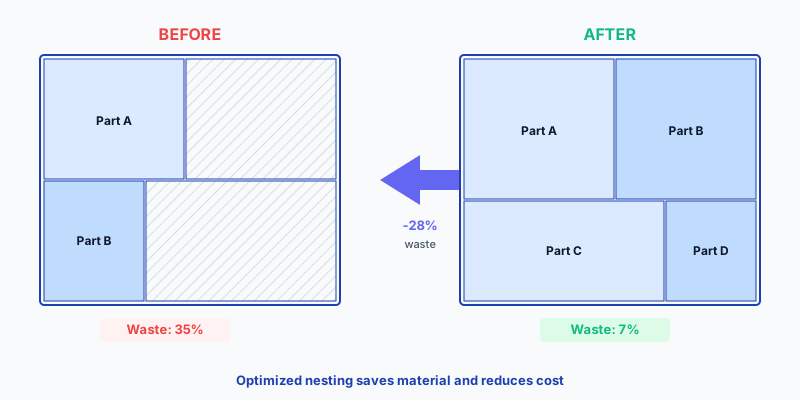
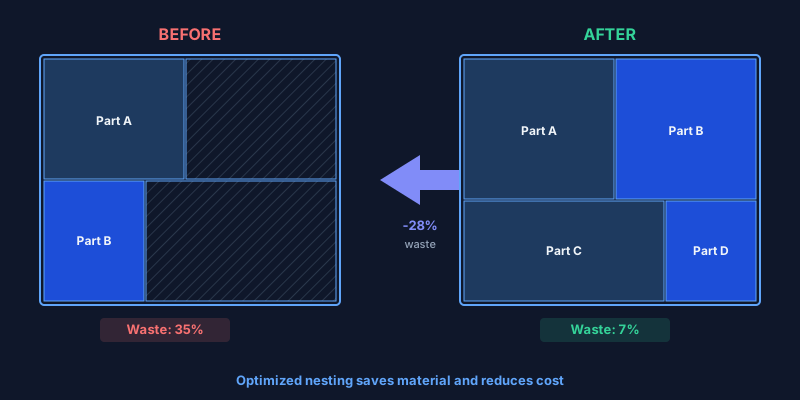
A typical cabinet shop processes 30–80 sheets of melamine per week. At industry-average waste of 25–35 %, that means 8–28 sheets end up as unusable offcuts every single week — hundreds of euros going into the skip while material prices keep climbing.
A panel cutting optimizer fixes this at the source. It takes your parts list — widths, heights, quantities — and arranges everything on stock sheets using a nesting algorithm that minimizes unused area. You get a labeled cutting diagram in seconds, not minutes. Waste drops to 5–10 %. The sheets you save go straight back to your bottom line.
CutOptim is a free online panel cutting optimizer built for professional furniture production. It handles hundreds of parts per run, supports multiple panel sizes and offcut reuse, enforces grain direction on veneered boards, compensates for blade kerf, and exports production-ready PDF and DXF diagrams for the workshop or CNC.
See it in action — the calculator above is live. Add a panel size, enter a few parts, and optimize. No signup needed for your first 2 runs.
The Numbers Speak for Themselves
waste reduction
On a medium kitchen using 16 sheets of melamine chipboard (2800 × 2070 mm, €48/sheet), dropping waste from 35 % to 9 % eliminates 4 sheets from the order — that is €192 saved on a single kitchen. Scale that across 20 kitchens per year: nearly €4,000 back in your pocket.
| Manual layout | CutOptim panel optimizer | |
|---|---|---|
| Layout time | 30–90 min per project | Under 10 seconds |
| Waste percentage | 25–35 % | 5–10 % |
| Multi-project sheet sharing | Almost never done | Built-in (mix parts freely) |
| Grain direction enforcement | Human error prone | Automatic per part |
| Edge banding tracking | Notes on paper | Marked per edge in export |
| Output for beam saw / CNC | Re-enter from sketch | Direct DXF import |
| Repeat orders | Re-plan from scratch | Save & reload project file |
| Cost | Your time | Free (2 cuts) · Pro from 9 €/mo |
How to Optimize Your Panel Cutting — Step by Step
Enter your stock panel sizes
Add one or more panel dimensions from your supplier — e.g., 2800 × 2070 mm Egger melamine, 2440 × 1220 mm MDF. Got offcuts? Add them as extra stock — the optimizer uses smaller pieces first.
Paste or type your parts list
Enter each part with name, width, height, and quantity. Copy from Excel or paste CSV data directly — CutOptim auto-parses it. Enable grain-lock on veneered fronts and visible panels.
Set blade kerf and edge trim
Enter kerf width: 3 mm for beam saws and panel saws, 0 mm for CNC with compensation. Set edge trim if your panels need factory-edge removal (typically 5–10 mm per side).
Optimize and review
Click optimize. The nesting algorithm arranges every part across the minimum number of sheets. Review the visual diagram — each part is labeled, waste is highlighted, and the sheet count and waste % are reported.
Export for production
Download a PDF with labeled diagrams for the saw operator (Pro: with your company logo), a CSV for material costing, or a DXF for direct CNC machine import. Print, hand over, cut.
Have a parts list? Try the optimizer now — free.
Open Panel OptimizerStandard Panel Sizes — EU Supplier Reference
Material Presets
EU| Material | Standard Sizes |
|---|---|
| Melamine chipboard (Egger, Kronospan) | 2800 × 2070 mm2620 × 2070 mm2440 × 1830 mm |
| Raw MDF / HDF | 2800 × 2070 mm2440 × 1220 mm2440 × 1830 mm |
| Laminated MDF (lacquered) | 2800 × 2070 mm2620 × 2070 mm |
| Birch plywood | 2500 × 1250 mm2440 × 1220 mm |
| HPL / compact laminate | 3660 × 1220 mm2440 × 1220 mm |
Technical Specifications
Who Benefits Most from Panel Cutting Optimization?
Furniture factories and serial producers
Production lines cutting wardrobes, desks, or shelf systems generate hundreds of parts daily. Running the cut list through the optimizer before sending it to the beam saw eliminates manual layout planning entirely. Across a week of production, the material savings often pay for the Pro subscription many times over. Saved project files make repeat orders effortless — reload, update quantities, re-optimize.
Bespoke cabinet shops
Custom kitchens and built-in furniture feature irregular part mixes that are difficult to arrange by hand. The optimizer packs these efficiently, and when schedules allow, parts from two concurrent projects can share sheets — squeezing value from every panel.
Shopfitters and exhibition builders
Premium decorative panels (acrylic-faced MDF at €80+/sheet, fire-rated boards) leave no room for waste. Import the cut list from your CAD system, optimize, and send the labeled PDF directly to the CNC team. No ambiguity, no re-measuring, no delays at the saw.
Construction and cladding contractors
Fiber-cement, HPL, and composite wall cladding involve many non-standard cut sizes alongside full panels. A panel optimizer ensures you order the correct number of sheets — no emergency re-orders mid-project.
Expert Tips for Maximum Panel Yield
Quote smarter. Run the optimizer before you quote the project. The exact sheet count gives you an accurate material cost — no padding “just in case,” no margin erosion from over-ordering.
Blade kerf is not optional. A standard beam-saw blade removes 3.2 mm per cut. Across 30 cuts on a sheet, that is nearly 100 mm of material consumed by the blade alone. Omit kerf and the last row of parts will not fit.
- One material per run. Optimize 18 mm white melamine separately from 16 mm raw MDF. Mixed-material diagrams lead to mistakes at the saw.
- Use grain-lock selectively. Enable grain direction only on visible parts (fronts, exposed sides). Leave it off for backs, bottoms, and shelves to give the algorithm maximum packing freedom.
- Add offcuts as extra stock. Enter usable leftover pieces as additional panels. The optimizer uses them before cutting into fresh sheets, clearing your storage and reducing new material orders.
- Label every part clearly. Use structured names (e.g., “K05-Left-Side”, “K05-Shelf-01”). Labels appear on the PDF diagram and eliminate confusion during assembly.
Free vs. Pro
| Feature | Guest | Free account | Pro |
|---|---|---|---|
| Optimizations | 2 total | 3 / month | Unlimited |
| PDF cutting diagrams | ✓ | ✓ | ✓ with your logo |
| CSV export | ✓ | ✓ | ✓ |
| DXF for CNC | — | — | ✓ |
| Save & reload projects | — | ✓ | ✓ |
| Price | Free | Free | 9 € / month |
Every wasted panel is money lost. Start optimizing — free.
No signup needed for your first 2 optimizations
Open Panel Cutting Optimizer