Plywood Cut Calculator - Optimize Plywood Sheet Layouts
Free plywood cut calculator to optimize layouts on standard plywood sheets. Plan cuts for 4x8, 5x5, and custom sheet sizes with minimal waste.
Updated: March 1, 2026
Free to use — no signup required
What is a Plywood Cut Calculator?
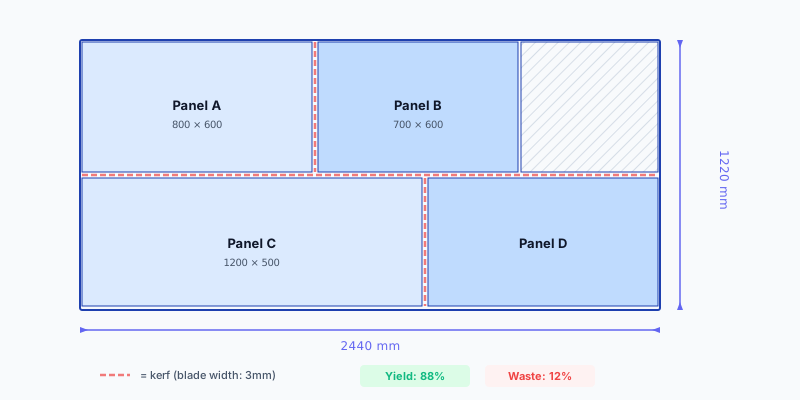
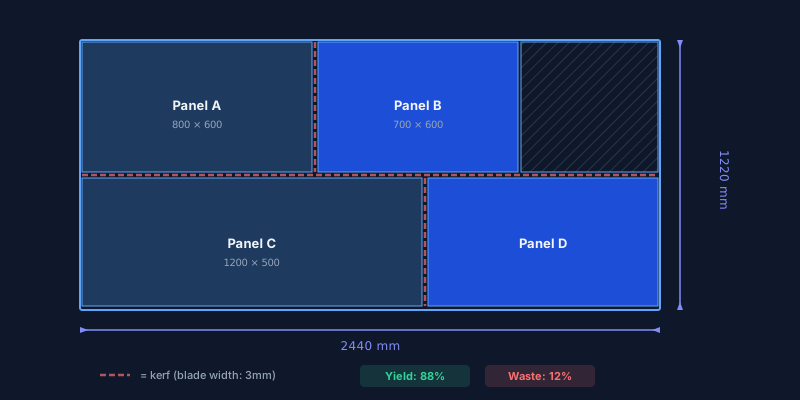
A plywood cut calculator — also called a plywood calculator or ply board calculator — helps you estimate how many plywood sheets you need and how to cut them with the least waste. You enter the dimensions of your stock sheets and the parts you need, and the tool computes an efficient layout that packs everything onto the fewest possible panels.
Plywood is one of the most versatile materials in woodworking and construction: cabinet backs, drawer bottoms, furniture panels, subfloors, sheathing, and decorative surfaces. Standard plywood sheets come in fixed sizes — 2440 × 1220 mm (4 × 8 ft), 2500 × 1250 mm, or 1525 × 1525 mm (5 × 5 ft) — and knowing exactly how many you need before visiting the supplier saves money and avoids waste.
CutOptim supports any plywood sheet size, accounts for blade kerf and edge trimming, respects grain direction on appearance-grade veneer, and exports labeled cutting diagrams as PDF, CSV, or DXF.
How to Use This Plywood Cut Calculator
Select your plywood sheet size
Choose a standard size like 2440 × 1220 mm or 1525 × 1525 mm, or enter a custom dimension. Add the quantity of sheets you have in stock, or leave it unlimited and let the optimizer tell you how many to buy.
Enter the parts you need
List each part with its width, height, quantity, and an optional label. For appearance-grade plywood (birch, oak veneer), enable grain-lock so the face veneer direction stays consistent across all parts.
Set kerf and edge trim
Enter your saw blade kerf — typically 3 mm for a circular saw. If your plywood has rough factory edges, set an edge trim of 5–10 mm per side.
View optimized cutting diagrams
The optimizer places your parts on the minimum number of sheets, labels each piece, and highlights waste areas. Review the total sheet count and waste percentage.
Export your plywood cutting plan
Download a PDF with diagrams and part labels, a CSV summary for costing, or a DXF file for CNC. Pro users can add their company logo to the PDF.
Standard Plywood Sheet Sizes
Material Presets
EU| Material | Standard Sizes |
|---|---|
| Birch plywood | 2500 × 1250 mm2440 × 1220 mm1525 × 1525 mm |
| Poplar plywood | 2500 × 1250 mm2440 × 1220 mm |
| Pine / spruce plywood | 2440 × 1220 mm2500 × 1250 mm |
| Okoumé marine plywood | 2500 × 1220 mm3100 × 1530 mm |
| Hardwood plywood (oak, walnut) | 2440 × 1220 mm2500 × 1250 mm |
Technical Specifications
Common Use Cases
Cabinet backs and drawer bottoms — Most cabinets use 3–6 mm plywood for backs and 9–12 mm for drawer bottoms. A plywood calculator packs these parts efficiently, often fitting an entire kitchen worth of backs onto 2–3 sheets instead of 4.
Furniture panels and shelves — Birch plywood shelving, desk tops, and side panels look best when the grain direction is consistent. The optimizer respects grain-lock and still finds tight layouts.
Subfloor and sheathing — Structural plywood for subfloors and wall sheathing involves cutting around obstacles (pipes, vents, doors). Enter the custom-sized pieces alongside full panels and let the tool compute the optimal sheet count.
Boat building and marine projects — Marine-grade okoumé plywood is expensive. Optimizing hull planking and bulkhead layouts on expensive sheets ensures minimal waste on material that can cost three to five times more than construction plywood.
waste reduction
Tips for Best Results
Always account for factory edge trim. Plywood sheets often arrive with rough or oversized edges. Trimming 5 mm from each side ensures clean reference edges and more accurate cuts.
- Grain matters on face veneer. Birch, oak, and walnut plywood have a distinct grain pattern on the face. Enable grain-lock on visible parts and leave it off for hidden parts to improve packing density.
- Separate by thickness. Run one optimization for 18 mm panels and another for 6 mm backs. Mixing thicknesses in a single run produces confusing diagrams.
- Include leftover pieces. If you have usable offcuts from a previous project, add them as extra stock. The optimizer tries to use smaller pieces first, saving full sheets.
- Round up your parts list. Add one or two spare parts for critical pieces. The small extra material cost is insurance against cutting mistakes, especially with expensive hardwood plywood.