Board Cutting Calculator - Optimize Sheet & Panel Layouts
Free sheet cutting calculator and board cutting optimizer for plywood, MDF and sheet goods — minimize waste and generate precise panel cut lists.
Every Wasted Board Costs You Money
Buy and cut a cabinet job’s boards without a plan and the order is padded: you round up, you cut each part type on its own sheets, and the offcuts never find a second use. How much that costs depends entirely on the job, so the numbers below come from one measured job rather than a promise.
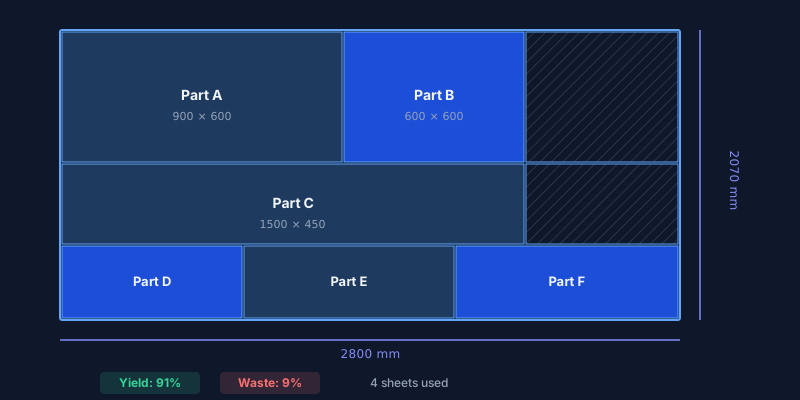
A board cutting calculator solves this in seconds. Enter your stock board sizes, paste your parts list, click optimize — the nesting algorithm packs everything onto the fewest possible sheets and hands you a labeled cutting diagram ready for the saw.
CutOptim is a free online board cutting calculator that handles multiple board sizes, blade kerf compensation, grain direction locking, and offcut reuse. No installation, no signup for your first cuts, and full PDF/DXF export for the workshop floor.
Try it right now — use the calculator above. Enter a board size, add a few parts, and see the optimized layout in seconds. No account needed.
See the Difference: One Job, Measured
A wardrobe-and-desk job in 18 mm board: 3 wardrobes and 4 desks, 52 parts, 37.15 m² of parts, cut from 2800 × 2070 mm sheets with a 3 mm kerf. Run through the same optimizer as the calculator above:
| Way of cutting | Sheets of 2800 × 2070 mm |
|---|---|
| One part type at a time (each type on its own sheets) | 12 |
| All 52 parts mixed by the optimizer | 8 |
| Area minimum — total part area ÷ sheet area, rounded up | 7 |
The optimizer is one sheet above the area minimum, which no layout can beat. On 2440 × 1220 mm (4 × 8 ft) sheets the same job takes 17 sheets mixed against 22 one type at a time, with an area minimum of 13. Your jobs will differ; our published benchmarks show how close the optimizer gets to the minimum across 1,200+ public test jobs.
| Pencil & paper layout | CutOptim board calculator | |
|---|---|---|
| Time to plan | 30–90 minutes | Seconds |
| Offcut reuse | Rarely considered | Added as extra stock automatically |
| Grain direction | Easy to forget | Enforced per part |
| Output | Rough sketch | Labeled PDF / DXF diagram |
| CNC integration | Manual re-entry | Direct DXF import |
| Cost | Your time | Free: 2 runs without an account, 3 a month with a free account · Pro from 9 €/mo |
How to Use This Board Cutting Calculator
Enter your stock board sizes
Add the width and height of each board or sheet you plan to cut from. You can mix several sizes (e.g., 2800 × 2070 mm and 2440 × 1220 mm). Leftover offcuts you want to use up belong in the Offcut inventory: with Use off-cuts automatically on, the optimizer packs them before opening new stock.
Add every part you need to cut
For each piece, enter its width, height, quantity, and a label (e.g., “Cab-03 Left Side”). If the board has a visible grain or veneer, enable grain-lock so the optimizer only places it in the correct orientation.
Set blade kerf and edge trim
Enter your blade kerf — 3 mm for a standard panel saw, 0 mm for CNC with tool compensation. If your boards have rough factory edges, set an edge trim of 5–10 mm per side.
Click Optimize and review the layout
The algorithm packs your parts across the minimum number of boards. Each piece is labeled on the visual diagram. Waste areas are highlighted so you can spot reusable offcuts at a glance.
Export for the workshop or CNC
Download a PDF with labeled cutting diagrams (with a free account: add your company logo), a CSV for material costing, or a DXF for direct CNC machine import.
Have boards to cut? Try it now — free.
2 free runs without an account, then 3 a month with a free account
Open Board CalculatorStandard Board Sizes — EU Quick Reference
Material Presets
EU| Material | Standard Sizes |
|---|---|
| Melamine chipboard (Egger, Kronospan) | 2800 × 2070 mm2620 × 2070 mm2440 × 1830 mm |
| MDF / HDF | 2800 × 2070 mm2440 × 1220 mm2440 × 1830 mm |
| Birch plywood | 2500 × 1250 mm2440 × 1220 mm1525 × 1525 mm |
| OSB (structural) | 2500 × 1250 mm2440 × 1220 mm |
| HPL / compact laminate | 3660 × 1220 mm2440 × 1220 mm |
This board calculator doubles as a sheet material calculator: enter any of these sizes as stock and it works out how many sheets the job needs. Cutting plywood only? The plywood cut calculator lists the standard plywood sheets, including 4×8 ft and 5×5 ft.
Technical Specifications
Who Needs a Board Cutting Calculator?
Cabinet makers and kitchen fitters
A standard kitchen has 15–30 cabinet boxes, each needing 5–6 panels: top, bottom, two sides, back, and shelf. That is 100–180 parts from melamine chipboard. Without optimization, workshops over-order by 2–3 sheets “just in case.” With CutOptim, you know the exact sheet count before placing the order — and parts from two concurrent kitchen projects can share sheets when schedules align.
Furniture workshops and batch producers
Wardrobes, desks, and bookcases share repeating dimensions. The optimizer groups identical parts, rotates for the tightest fit, and often saves a full sheet on every 10-unit batch. Save the project (Pro), reload it next month, adjust quantities, re-optimize — production planning in under a minute.
Shopfitters and exhibition builders
Premium boards (acrylic-faced MDF at €80+, fire-rated panels) make every wasted sheet expensive. Import your CAD cut list, optimize, and send the labeled PDF directly to the CNC operator. No ambiguity, no re-measuring, no delays. Starting from a parts list for the whole job rather than from the boards? The cut list calculator is built around that list.
DIY builders
Even a single bookcase with 12 parts benefits. The visual cutting diagram tells you exactly how many boards to buy before you drive to the hardware store — no more guessing, no return trips for “one more sheet.”
Pro Tips for Better Board Cutting Results
Reuse your offcuts. Save leftover pieces from previous projects to the Offcut inventory rather than typing them in as stock boards. With Use off-cuts automatically on, the optimizer packs parts onto them before opening a new sheet; a piece you move into the stock table with ↑ is starred and used first, never more than its quantity. A leftover typed in as a stock row is used first only with Limited supply and a ★ — with Unlimited supply it counts as a size you can buy again.
Never skip blade kerf. A standard panel-saw blade removes 3 mm per cut. Across 20 cuts on a sheet, that is 60 mm of “invisible” loss. Omit kerf and your last part will not fit.
- One material per optimization. Run 18 mm white melamine and 16 mm birch plywood separately. Mixed-material diagrams cause errors at the saw.
- Account for edge banding. Edge tape is glued onto the cut edge, so it makes the part larger. If your list holds finished sizes, cut the panel smaller by the tape thickness on each banded edge — a 600 mm finished part with 2 mm tape on both ends is cut at 596 mm.
- Label everything. Use clear part names (e.g., “Wardrobe-02 Shelf”) — they appear on the PDF diagram and make assembly foolproof.
- Save projects for repeat orders (Pro). When a client changes quantities or a part needs recutting, reload the saved layout and re-optimize instead of starting from scratch.
Free vs. Pro — Choose Your Plan
| Feature | Guest | Free account | Pro |
|---|---|---|---|
| Optimizations | 2 total | 3 / month | Unlimited |
| PDF cutting diagrams | ✓ | ✓ with your logo | ✓ with your logo |
| CSV export | ✓ | ✓ | ✓ |
| DXF for CNC | — | ✓ | ✓ |
| Save & reload projects | — | — | ✓ |
| Share plans by link | — | — | ✓ |
| Price | Free | Free | 9 € / month |
Stop wasting boards. Optimize your next project — free.
No signup needed for your first 2 optimizations
Open Board Cutting Calculator
Frequently asked questions
How does the board cutting calculator minimize waste?
Can I specify grain direction for my parts?
What blade kerf width should I enter?
Does this work for melamine and laminated boards?
Can I use boards of different sizes in one project?
Related
Ready to optimize your cuts?
2 free runs without an account, then 3 a month with a free account
Open App