Wood Cutting Calculator - Optimize Lumber & Timber Cuts
Free wood cutting calculator for lumber optimization. Plan cuts for boards, timber, and dimensional lumber to reduce waste and save money on materials.
Updated: March 1, 2026
Free to use — no signup required
Wood Is Expensive — Stop Throwing a Quarter of It Away
A solid oak panel costs €60–120 per square metre. A birch plywood sheet runs €30–50. Even basic pine board is €15–25. Now picture every project where you measured, sketched a rough layout on scrap paper, cut — and ended up with a pile of offcuts too short to use. Across a year of projects, that pile represents thousands of euros in material you bought but never turned into a finished product.
A wood cutting calculator changes the equation. Enter your panel sizes, list every part you need, and the algorithm finds the arrangement that fits the most parts on the fewest sheets. Waste drops from 25–35 % to under 10 %, your offcut rack shrinks, and your material bill goes down — project after project.
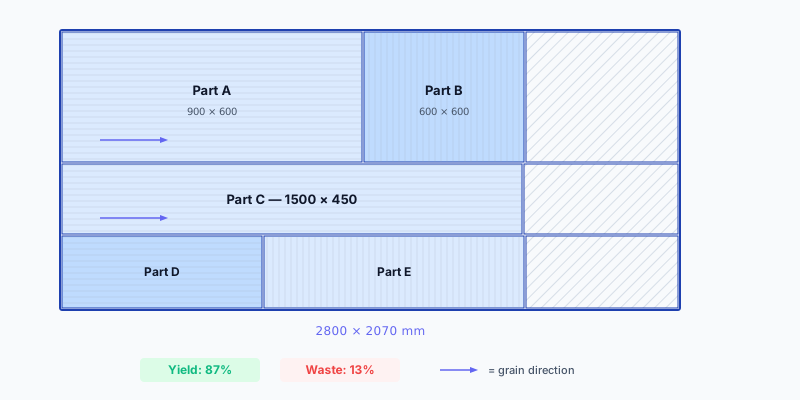
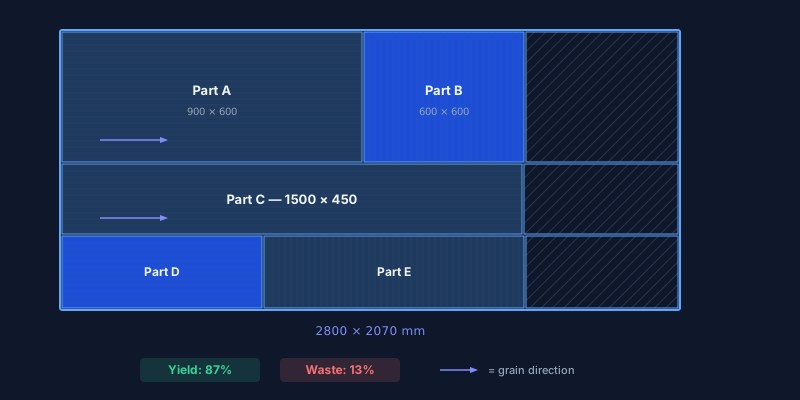
CutOptim is a free wood cutting calculator that works with any rectangular panel: solid hardwood, veneered chipboard, plywood, MDF, pine board, or laminated panels. It respects grain direction, compensates for blade kerf, and exports production-ready cutting diagrams as PDF, CSV, or DXF.
Try it now — the calculator above is live. Enter a panel size and a few parts, hit optimize, and see how much material you save. No signup needed.
Your Material Savings at a Glance
waste reduction
On a typical furniture project with 10 panels of veneered particleboard (2800 × 2070 mm at €48 each), reducing waste from 28 % to 6 % can save you 2–3 full panels — €96–144 per project. Over a year of 15 projects, that is €1,400–2,100 in material alone.
| Manual layout | CutOptim optimizer | |
|---|---|---|
| Planning time | 30–60 min per project | Under 10 seconds |
| Typical waste | 25–35 % | 5–10 % |
| Grain direction errors | Common oversight | Enforced automatically |
| Offcut tracking | Pile in the corner | Added as extra stock |
| Workshop output | Pencil sketch | Labeled PDF with part IDs |
| CNC integration | Re-enter manually | Direct DXF export |
| Cost | Your time | Free (2 cuts) · Pro from 9 €/mo |
How to Use This Wood Cutting Calculator
Enter your wood panel dimensions
Add the width and height of each stock panel — whether it is a full 2800 × 2070 mm veneered board or a 1200 × 450 mm offcut from last week. The optimizer uses smaller pieces first to save full sheets.
Add every part you need
Enter name, width, height, and quantity for each piece. Working with grain-sensitive wood (oak veneer, birch plywood)? Enable grain-lock to ensure the optimizer only places the part in the correct orientation.
Configure kerf and edge trim
Set your blade kerf — 3 mm for a table saw, 3.2 mm for a standard panel saw, 0 mm for CNC. If panels have rough factory edges, set an edge trim of 5–10 mm per side.
Optimize and review the diagram
One click, and the nesting algorithm packs your parts across the minimum number of panels. Each piece is labeled. Waste areas are highlighted. You see the exact sheet count and waste percentage.
Export and start cutting
Download a PDF with labeled diagrams for the saw team, a CSV for costing, or a DXF for CNC import. Pro users can brand the PDF with their company logo and slogan.
Ready? Paste your parts list and optimize.
Open Wood CalculatorStandard Wood Panel Sizes — EU Reference
Material Presets
EU| Material | Standard Sizes |
|---|---|
| Solid wood (beech, oak, ash) | 4000 × 600 mm4000 × 800 mm2500 × 1250 mm |
| Veneered particleboard (Egger, Kronospan) | 2800 × 2070 mm2620 × 2070 mm |
| Birch plywood | 2500 × 1250 mm2440 × 1220 mm1525 × 1525 mm |
| Pine / spruce panel (glued) | 4000 × 600 mm2500 × 1250 mm2000 × 400 mm |
| Raw MDF | 2800 × 2070 mm2440 × 1220 mm |
Technical Specifications
Who Uses a Wood Cutting Calculator?
Custom furniture makers
Bespoke kitchens, wardrobes, and bathroom vanities mean dozens of unique panel sizes. A wood cutting calculator handles 100+ parts in a single run, packing sides, shelves, backs, doors, and drawer fronts onto the fewest possible boards. The labeled PDF doubles as a production sheet the saw operator can follow step by step.
Solid hardwood workshops
Oak, walnut, and cherry panels can cost €80–150 per square metre. Every discarded offcut hurts. The optimizer arranges parts for maximum yield and flags pieces where grain direction must be preserved — so your expensive hardwood ends up in finished furniture, not the scrap bin.
Production and batch manufacturers
Running 20 identical desks or 50 shelving units? Save the project file, reload it when the next batch comes in, and adjust quantities. The optimizer recalculates in seconds, keeping your material orders precise across production runs.
Weekend woodworkers and DIY builders
Building a bookcase, a workbench, or a garden shed? Enter your parts, optimize, and take the diagram to the hardware store. You will know exactly how many panels to buy — no second trip, no leftover half-sheets you will never use.
Pro Tips for Better Wood Cutting Results
Grain direction is critical for visible parts. Oak veneer, birch plywood faces, and solid wood panels have a distinct grain. Enable grain-lock on drawer fronts, door panels, and visible sides. Leave it off for backs and bottoms — unlocked parts give the algorithm more room to optimize.
Measure your panels, do not trust the label. Supplier-stated dimensions can vary by 1–3 mm. For tight fits, measure the actual width and height and enter those values. A few millimetres matter when the optimizer is filling every corner.
- One species and thickness per run. Do not mix 18 mm oak with 12 mm birch plywood. Separate runs produce clear diagrams and prevent cutting the wrong board on the saw.
- Enter offcuts as extra stock. That 900 × 450 mm oak piece from last month? Add it. The optimizer uses it before touching a fresh panel.
- Account for blade kerf. A table saw removes 3 mm per cut. 20 cuts = 60 mm lost. Skipping kerf means the last part will not fit.
- Add edge banding thickness. If parts receive 0.5 mm or 2 mm veneer tape, increase dimensions accordingly so the finished size is correct after banding.
Free vs. Pro
| Feature | Guest | Free account | Pro |
|---|---|---|---|
| Optimizations | 2 total | 3 / month | Unlimited |
| PDF diagrams | ✓ | ✓ | ✓ with company logo |
| CSV export | ✓ | ✓ | ✓ |
| DXF for CNC | — | — | ✓ |
| Save projects | — | ✓ | ✓ |
| Price | Free | Free | 9 € / month |
Your wood deserves a better plan. Optimize now — free.
No signup needed for your first 2 optimizations
Open Wood Cutting Calculator