What Is the Cutting Stock Problem? A Plain-Language Guide
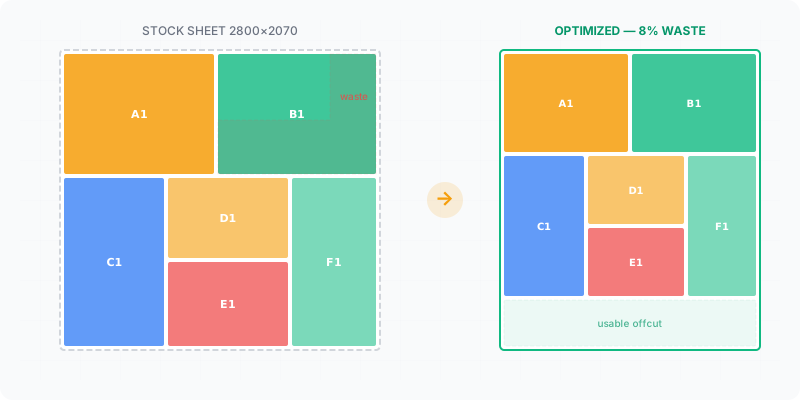

If you’ve ever stood in front of a stack of plywood sheets with a parts list and a pencil, sketching rectangles on the back of an envelope, you already know this problem. You just didn’t know it had a formal name. The cutting stock problem is what happens when you need to slice large raw materials into smaller required pieces and you want to waste as little as possible. It’s a form of bin packing — fitting items into containers with minimal leftover space. Manufacturers, cabinet shops, and hobbyist woodworkers all face it every single day.
What you’ll learn in this guide:
- What the cutting stock problem actually is (without the academic jargon)
- Why your brain can’t solve it efficiently past a handful of parts
- How much extra material manual planning typically wastes
- What software does differently to find better layouts
The Problem Every Woodworker Knows
Picture this: you’re building a set of kitchen cabinets. You need 14 side panels, 7 shelves, 7 backs, and 14 door panels — 42 parts total, cut from standard 2800×2070 mm sheets. Each part has specific dimensions. Some need the grain running lengthwise, others don’t matter. You’ve got a 3 mm kerf from your table saw to account for.
Now figure out the fewest sheets you can buy to get all 42 parts. Go ahead — try it with a pencil and paper. You’ll spend 20 minutes on the first sheet layout alone, erasing and redrawing. By the third sheet, you’ve lost track of which parts you’ve already placed. And even after all that effort, you have no way of knowing whether a better arrangement exists.
This is the cutting stock problem stripped down to its core: given a set of required pieces and a supply of standard-size stock material, find the arrangement that uses the fewest sheets while producing the least waste.
The Math Behind It (Simplified)
Computer scientists classify the cutting stock problem as “NP-hard.” In practical terms, that means the number of possible arrangements grows so fast with each additional part that no computer can test every single option in a reasonable time frame. Ordering 40 parts alone gives 40 factorial sequences — a number with 48 digits — and that is before you decide where on the sheet each one lands, or which of them get rotated. At 100 parts, roughly one fitted kitchen, the orderings outnumber the atoms in the observable universe by more than seventy orders of magnitude.
ways to order just 40 parts — about 8 followed by 47 zeros, and the ordering is the easy half of the problem
This is the same family of problems first studied by Kantorovich (1939) and later solved with column generation by Gilmore and Gomory (1961). Algorithms don’t try every combination. Instead, they use heuristics — smart shortcuts like first-fit decreasing, column generation, or genetic algorithms — that find near-optimal solutions within seconds. They won’t always find the absolute perfect layout, but they’ll consistently beat any human attempt by a wide margin.
The trade-off is straightforward: a tiny amount of computation time in exchange for measurably less wasted material.
Where Did the Cutting Stock Problem Come From?
It was formalised inside industry rather than inside a university, by people trying to stop expensive raw material turning into offcuts.
Kantorovich wrote the first version while consulting for a plywood trust on how to plan production with the least waste — work later recognised with a Nobel Memorial Prize in economics. The practical solution method arrived from a different industry two decades on: a paper mill produces master rolls of one fixed width and has to slit them into the narrower widths its customers ordered. Every combination of widths that fits across a roll is one cutting pattern, and the list of possible patterns is far too long to write down. Gilmore and Gomory’s answer was not to write it down — generate only the patterns the solution turns out to need.
That vocabulary survives on your shop floor. A layout on a single sheet is a pattern; a cutting plan is a set of patterns plus how many sheets to run of each. When an optimizer reports “three sheets like this, one like that”, it is handing you the same shape of answer the 1961 method produced for paper mills, applied to plywood.
One Dimension or Two — and Why It Matters
The same problem shows up in two shapes, and they stop being equally difficult the moment you try to cut them.
In one dimension only length matters — bars, pipes, profiles, timber lengths, a roll of edge banding. There is exactly one way for a part to sit on a bar, so the whole decision is which cuts come off which stock length. This is the original form; the paper mill’s slitting problem is a 1D problem.
Two dimensions give a part a width, a height, and often the freedom to rotate, so one sheet has an enormous number of arrangements instead of one ordering. That is where the combinatorial explosion above comes from.
Then reality adds a constraint the textbook version does not have: guillotine cutting. A panel saw, and a table saw for that matter, can only make cuts that run edge to edge across whatever board is on the table at that moment. You cannot cut a notch out of the middle of a sheet. A layout that packs beautifully but needs a cut stopping halfway across is not a plan, it is a picture. Free nesting — parts sitting anywhere, in any orientation — belongs to a CNC router, which cuts each outline on its own. That single constraint is why a layout that is optimal on paper can be unbuildable in your shop. 1D vs 2D cutting optimization covers where the line falls.
Why Manual Calculation Always Wastes More
Let’s walk through a concrete example. You need 5 large panels from a standard European sheet (2800×2070 mm):
- 2× side panels: 2100×600 mm
- 2× shelves: 800×500 mm
- 1× back panel: 2100×800 mm
Manually, most people place the biggest pieces first and fit smaller ones in the gaps. With a spreadsheet, you can track area usage but still can’t test rotations or alternative arrangements quickly. An optimizer algorithm evaluates hundreds of layout variations in under a second.
| Method | Waste % | Time Spent | Sheets Used |
|---|---|---|---|
| Manual (pencil & paper) | 25–35% | 20–40 min | 2 |
| Spreadsheet tracking | 18–25% | 15–30 min | 2 |
| Optimization software | 8–14% | Under 10 sec | 1–2 |
Manual vs. optimized waste
That difference matters fast. At $50–70 per sheet, saving even one sheet on a kitchen project pays for itself immediately. On a production run of 50 cabinets, the savings compound into thousands of dollars.
💰 How much could you save per year?
Real-World Use Cases
The cutting stock problem shows up everywhere materials get cut from standard stock sizes:
- Cabinetmaking and furniture production — Melamine, MDF, and plywood panels cut to dozens of part sizes per project. Grain direction constraints make it harder.
- CNC nesting — Automated cutting machines need a layout file. The optimizer generates it directly, eliminating manual nesting on the machine controller.
- Sheet metal fabrication — Steel and aluminum sheets cost significantly more per square meter, so even 3–5% waste reduction translates into serious money.
- Glass and tile cutting — Fragile materials where incorrect cuts can’t be reused. Getting the layout right the first time prevents expensive mistakes.
- Linear cutting (1D) — Bars, pipes, profiles, and lumber lengths. Same problem, one fewer dimension. Still NP-hard with enough parts.
How Cutting Optimization Software Solves It
The process is simpler than you’d expect. You enter your required parts — dimensions, quantities, grain direction if applicable. You specify your stock sheet size (or multiple sizes if your supplier offers them). You set the kerf width for your saw blade, typically 3–4 mm. Then you click optimize.
Behind the scenes, the software runs a series of algorithmic passes. It tries different part placements, rotations (when grain allows it), and sheet arrangements. It evaluates each layout by total waste percentage and number of sheets required. Within seconds, it returns a cutting plan — a visual map of exactly where each part goes on each sheet.
You get a printable layout, a parts list with positions, and clear waste numbers. No guesswork, no redrawing, no missed parts.
Pro tip: When entering parts into an optimizer, always double-check that your kerf setting matches your actual blade. A 3 mm kerf entered as 0 mm can shift every cut on the sheet, leaving parts that are too narrow to use.
Can It Be Solved Perfectly?
On a small job, yes — and it can even be proved. On a large one, no, and that matters less than it sounds.
The proof comes from a lower bound, which an optimizer can work out before arranging anything. Add up the area of every part, divide by the area of one sheet, round up: that is the fewest sheets any plan could possibly use, because material cannot be created. If the plan the software finds uses exactly that many sheets, there is no better plan — not “none was found”, but none exists. That is the difference between a good answer and a proven one.
When a plan lands above the bound, the gap has two possible explanations and you usually cannot tell which. Either a better arrangement is waiting to be found, or the bound was never reachable for your part sizes — an area sum has no idea that three 900 mm parts will not fit across a 2070 mm sheet no matter how they are turned. The bound is a floor, not a promise.
Does letting the search run longer produce a better plan? Up to a point. The large gains arrive first, because the obviously better placements are the easiest to find; after that the search is largely confirming that what it already has is hard to beat. A slow answer is almost never the reason a job wasted material. The inputs are — a wrong kerf, a missing part, a stock size you cannot actually buy.
See how much material you can save
No signup required — paste your cut list and get an optimized layout in seconds
Try the free optimizer