Minimize Cost vs Minimize Waste: Which Goal to Pick
Quick answer
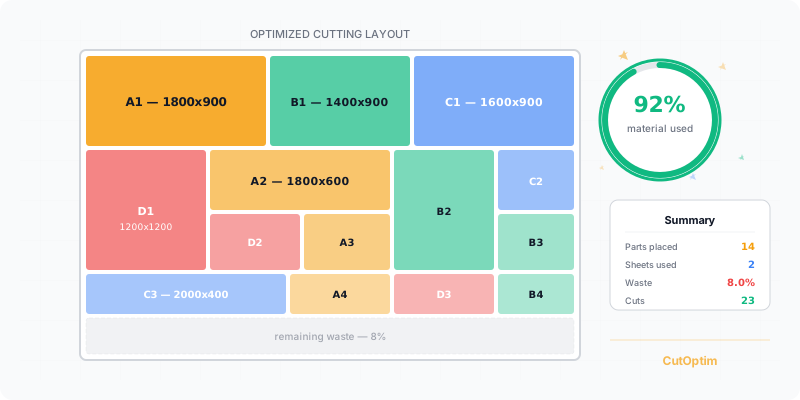
CutOptim’s optimization goal answers two different questions. Minimize waste finds the plan that uses the least material. Minimize cost finds the plan with the lowest total bill — which, when your boards are priced differently, can mean deliberately using more material to spend less money. The right goal depends on how you are actually charged.
“Use the least material” sounds like it must be the same as “spend the least money.” It usually is — but only while every board costs the same per unit area. The moment your stock sizes carry different unit prices, the two goals can point at different plans, and picking the wrong one leaves money on the table.
Two Different Questions
Every optimizer minimises something. The question is what.
- Minimize waste minimises area consumed — the least material for the parts you need, given the stock available. It is the default, on every plan.
- Minimize cost minimises the total bill — the cheapest combination of the boards you have priced, even if that combination is not the tightest packing. It needs an account — every signed-in plan has it, Free included.
Both run the exact same guillotine algorithm underneath. They place parts identically; they only disagree on which finished plan to call the winner. When there is only one price in play, they never disagree at all.
What “Minimize Waste” Optimizes
Minimize waste is the honest default. It consumes your stock in the order you entered it — starred rows first when supply is Limited, and offcuts moved in from the Offcut inventory first in either mode — and keeps the plan that leaves the least leftover area. If you buy one board size at one price, this is also the cheapest possible plan, because fewer boards at a fixed price is simply a smaller bill.
It is the right answer far more often than not. Most shops cut one sheet good at a time, are billed per board, and would rather end the day with one big reusable offcut than a slightly higher yield spread across slivers. For all of those, the least-material plan is the plan you want. See what material yield measures for how that number is defined.
What “Minimize Cost” Optimizes
Minimize cost changes the objective from area to money. When you have several stock sizes at different unit prices, it searches for the mix that produces the lowest invoice for this job. In 2D that means it can mix stock sizes on one run — large parts on a wide, expensive board; small parts on cheaper narrow ones. In 1D it picks the cheapest bar length that does the job.
Minimize cost only does anything if your stock table has prices. Turn on Show price columns under Settings → More → Cost (choosing Min. cost as the goal turns it on automatically) and enter a price per stock item. With no prices there is nothing to compare, so the goal falls back to producing the same plan as Minimize waste.
The key word is bill. Minimize cost is not trying to make a pretty layout or a high yield — it is trying to make the number at the bottom of your material order as small as possible.
Where does the saving come from? Two boards of the same material rarely cost the same per square metre. A big sheet often carries a premium, and a smaller size or a shop offcut can be markedly cheaper for the same area. When those differences are large enough, spreading a job across the cheaper stock beats concentrating it on the dear stock, even though the cheaper route wastes a little more. Minimize cost is simply the search that notices this and acts on it, board by board, instead of assuming every square metre costs the same.
When Cheaper Means More Material
This is the idea that surprises people, so it is worth stating plainly: the cheapest plan can consume more material than the densest one.
| Situation | Minimize waste picks | Minimize cost picks |
|---|---|---|
| One board size, one price | Densest plan | The same densest plan |
| Wide board dear, narrow board cheap per m² | Whichever packs tightest | A mix — small parts onto the cheaper narrow board |
| Full sheets dear, offcuts cheap | Fewest sheets | Uses cheap offcuts even if total area rises |
| Prices roughly equal per m² | Densest plan | Agrees with Minimize waste |
Imagine a job that fits on one large expensive board at high yield, or on two cheaper small boards at lower yield. Minimize waste keeps the single-board plan — less material. Minimize cost may keep the two-board plan if two cheap boards cost less than one dear one — more material, smaller bill. Neither is wrong; they answer different questions, and only you know which one your accountant is asking.
This is also why yield alone is a poor way to judge a cost-mode plan. A cost-optimised run can show a lower utilisation figure and still be the correct plan, because the money saved on cheaper stock more than covers the value of the extra offcut. If you compare the two goals only on their yield percentage, Minimize cost will always look worse — the number it improves is not on that line. Judge it on the total at the bottom of the order instead, which is exactly the figure CutOptim reports back to you.
After a cost-mode run, CutOptim spells the trade-off out on the page: the Overview of the PDF and Excel exports states how much cheaper this plan is on the invoice than the least-material plan, and how much extra material that saving cost. You never have to guess what you traded.
Minimize Cost Never Drops Parts
A fair worry about a money-first goal is that it might leave a part uncut to save a board. It does not. Both goals place the most parts they can first, and only compare plans — on cost or on material — among the ones that cut everything. A plan that leaves a piece behind can never win on price, so switching to Minimize cost is safe: it re-ranks complete plans, it does not abandon parts to cheapen the bill.
The same rule protects your priority stars when stock supply is Limited. There the starred rows are used up first, before price is considered, and no board of another size is opened that the starred stock could replace — so a remnant you want gone is consumed even where a cheaper plan existed without it. With Unlimited supply the ★ column is hidden and not used: the optimizer simply buys what the plan needs. To use up saved offcuts in either mode, move them in from the Offcut inventory (↑ or All to stock) — those rows are starred automatically, used first and never more than their quantity.
When to Choose Each
The decision comes down to how you buy material.
- Choose Minimize waste when your stock is one material at one price, when you are charged per board rather than per area, or when a clean reusable offcut is worth more to you than a marginal saving. This is most jobs.
- Choose Minimize cost when you genuinely stock the same material at meaningfully different unit prices — several board sizes, or offcuts and remnants priced below full sheets — and the total spend on this particular job matters. If your prices are all roughly equal per unit area, the goal will simply agree with the default.
If you are unsure, run the job both ways. On priced stock the two plans and their two totals are right there to compare, and on flat-priced stock they will be identical — which is its own answer.
Try It on Your Own Stock
Enter your parts and a couple of stock sizes at different prices below, then compare the plans. On equal prices they match; on unequal prices you will see where money and material part ways.
For the full goal selector, price columns and exports, open the optimizer, or start from the panel cutting optimizer. To get accurate stock prices in the first place, see how to order cut to size.
Compare the cheapest and the densest plan on your own job
Minimize waste on every plan; Minimize cost on every signed-in plan, Free included, once your stock has prices — the trade-off is written on the export. · 2 free runs without an account, then 3 a month with a free account
Open the optimizerFrequently asked questions
What is the difference between Minimize waste and Minimize cost?
How can a cheaper plan use more material?
Do I need to enter prices for Minimize cost to work?
When should I use Minimize waste?
When should I use Minimize cost?
Does Minimize cost ever drop parts to save money?
What about priority stars in cost mode?
Related
Ready to optimize your cuts?
2 free runs without an account, then 3 a month with a free account
Open App