How to Order Cut-to-Size Panels Without Rework
The parts arrive, the stack looks right, and the first shelf goes in perfectly. The second one does too. Then you pick up a side panel and the oak grain runs across it instead of down. Nobody made a mistake: the order said 300 × 764 where every other row said 764 × 300, the saw read the first figure as the grain direction, and it cut exactly what it was told.
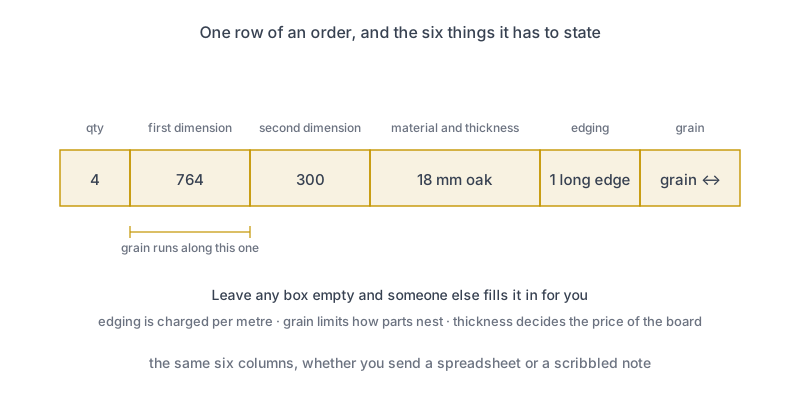
A cut-to-size order is a specification, not a shopping list. Every row has to state a quantity, both dimensions, the material and its thickness, which edges get banded and which way the grain runs — and it has to say which convention those dimensions follow. What you leave out does not stay open; it gets decided by somebody who has never seen the thing you are building.
What you’ll learn in this guide:
- The six things every row of an order has to carry
- Why the order of the two dimensions is a real decision, not formatting
- Whether the size you write includes the edge banding
- What a cutting service actually bills, and which choices move the bill
What Does a Cut-to-Size Service Actually Need?
Six things per row, and none of them is optional in practice — only in the order form.
Quantity and both dimensions are obvious. The other three are where orders go wrong. Material and thickness have to be on every row, not just at the top, because a project that mixes 18 mm carcass board with a 4 mm back is two materials and gets cut from two different boards. Edging has to say which edges, not how many. And grain has to be stated for anything with a visible pattern, because it is the one property the saw cannot infer from the numbers.
| Column | What it decides | What happens if you leave it out |
|---|---|---|
| Quantity | How many identical parts | Nothing — this one is always asked |
| First dimension | Usually the grain direction | The service picks, and half your parts turn out rotated |
| Second dimension | The other side | As above |
| Material and thickness | Which board is used, and the price | Everything gets cut from the default board on the machine |
| Edge banding | Which edges are finished | Raw edges where you wanted banding, or banding you pay for and do not need |
| Grain direction | How parts may be rotated when nesting | Free rotation, which nests better and looks wrong |
A cut list built in an optimizer already carries all six, which is most of the reason to build one rather than write parts on a page.
Which Dimension Comes First?
Whichever you decide — but say so on the order, and keep it the same on every row.
Most services read the first figure as the length and the grain as running along it. That is a convention rather than a standard, which is exactly why it needs stating: if half your rows follow it and half do not, both halves look correct and only one of them is. Write it at the top of the sheet in plain words: all sizes are length × width, grain runs along the length.
The parts most likely to bite are square-ish ones. A 600 × 560 mm cabinet side looks the same either way on paper and looks completely different in oak. A 764 × 300 mm shelf is obvious to you and not to anyone else.
Check the near-square parts twice before sending. On a part that is 600 by 560, a swapped pair is a 40 mm error that no one will notice until the box is assembled — and on a patterned decor it is not an error you can plane out.
Does the Ordered Size Include the Edging?
Ask, because both answers are common and the two differ by the thickness of the tape on every banded edge.
Some services cut the part to the figure you wrote and apply banding on top of it, so a part with two banded long edges finishes slightly wider than ordered. Others subtract the banding first so that the finished part matches your number exactly. Neither is wrong. Both produce parts that fit, provided you knew which one you were getting.
Where it matters is anywhere parts have to add up: a run of drawer fronts across a cabinet, a shelf that has to slide into a fixed opening, two doors meeting in the middle. Where it does not matter is a shelf sitting loose on supports. Decide once, write the answer on the order, and use the same assumption in your own drawing.
What Are You Actually Paying For?
The board, the cutting, the edging by the metre, and — at some services — a setup charge per material or per order.
That breakdown is worth knowing because it tells you which decisions actually move the bill, and they are not the ones people optimize. Shaving 5 mm off a shelf changes nothing. Adding a third thickness to the project can add a whole board plus another setup, because a 12 mm part cannot come out of the 18 mm sheet you are already paying for.
| Decision | What it changes on the invoice | Worth doing? |
|---|---|---|
| Fewer different materials | One board and one setup instead of two | Almost always |
| Fewer banded edges | Direct saving per metre of tape | Only where the edge is genuinely hidden |
| Better nesting of the same parts | Fewer boards bought | Yes, and it is free to try |
| Rounding parts to tidy numbers | Usually nothing at all | No — accuracy costs the same as approximation |
| Taking the offcuts home | Nothing now, material you already own later | Yes, if you have somewhere to put them |
Running the parts through the cut list optimizer before you order tells you how many boards the job needs, which is the number the quote turns on. If the service’s own nesting comes back needing more, that is a conversation worth having before they cut.
Which File Should You Send?
Send a spreadsheet or CSV as the order and a PDF next to it as the human check.
The spreadsheet is the one that matters, because it can be read into their software without anybody retyping your dimensions — and retyping is where a 764 quietly becomes a 746. The PDF earns its place by being the copy a person can scan for anything obviously wrong before the saw starts. Both carry the same numbers, which is the point.
DXF is a different tool for a different job: it describes geometry for a CNC router cutting shapes, and a panel saw cutting rectangles has no use for it. If you are sending parts to a CNC shop instead, the CNC export guide covers what changes.
One more thing worth sending: printed labels. A stack of forty identical-looking rectangles is genuinely hard to sort by tape measure, and a label on each part turns assembly from a puzzle back into a task.
Common Mistakes
Writing the material only once, at the top. The moment a project has a second thickness, per-row material is the only thing that keeps them apart. Services cut what the row says.
Ordering the carcass size instead of the part size. The height of the cabinet is not the length of its sides. If your list came from a drawing rather than a carcass calculation, check the subtraction before you send it.
Counting banded edges instead of naming them. “Two edges” does not say which two. On a shelf, the front is obvious; on a side panel, it is not.
Leaving grain unspecified on decor board. Without it, parts get rotated to nest better — which is the correct behaviour for a plain board and a visible defect on an oak one.
Sending a picture of a handwritten list. It will be retyped, and every retyped digit is a chance to lose one. The five minutes you save cost somebody else twenty and cost you a part.
When Is Cut-to-Size the Wrong Choice?
When the parts are not rectangles, when the tolerance is tighter than a panel saw, or when you genuinely need to fit as you go.
A cutting service is fast and accurate at rectangles, and that is what it charges for. Curves, cutouts and anything needing a template belong on a router. Work where the final size depends on something you have not measured yet — an alcove that is out of square, a worktop scribed to a wall — wants an oversize blank and a jigsaw on site, not a finished part cut last week.
The other case is small quantities of cheap board. Below a certain size the setup dominates, and a sheet plus an afternoon with a track saw wins on both cost and turnaround. The moment a project has more than a handful of parts, or any banding at all, that reverses quickly.
Build the parts list, see how many boards it really needs, and export the spreadsheet the cutting service can read.
2 free runs without an account, then 3 a month with a free account
Open App — FreeFrequently asked questions
What does a cut-to-size service need from me?
Which dimension should I write first, length or width?
Does the size I order include the edge banding or not?
What am I actually charged for at a cutting service?
Should I send a PDF, a spreadsheet or a DXF?
Do I get the offcuts back?
Related
Ready to optimize your cuts?
2 free runs without an account, then 3 a month with a free account
Open App