How to Quote Laser-Cut Sheet Metal Parts
Quick answer
Quote a laser job from a nest on the sheet sizes you actually stock, not from the parts’ area. The nest gives you the two numbers a quote needs: which sheets you will consume (the material line) and how much cutting there is (cut length and pierce count, the machine-time line). On the example below, allowing a second, smaller sheet size cuts the material from €80 to €64 for the same 28 parts.
A customer sends a DXF and asks for a price by this afternoon. The quick way is to add up the parts’ area, add a waste percentage and multiply by the price per square metre. It is fast, and it is wrong in both directions: too high when the parts interlock well, too low when they do not, and it never tells you that one more sheet size in the rack would have made the job cheaper.
This guide walks through the method that holds up: nest first, then read the quote off the nest.
What you’ll learn:
- Why the material line has to come from whole sheets
- How spacing, edge clearance and sheet sizes change the price
- A measured example with two sheet sizes
- How to turn cut length and pierces into machine time
Why the parts’ area is the wrong starting point
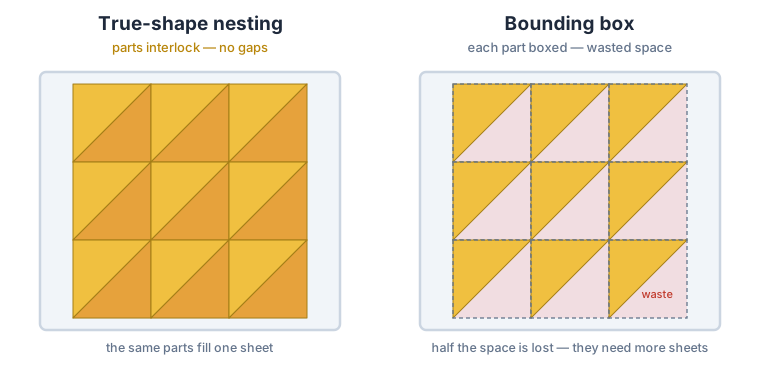
The steel you pay for is the sheet, not the parts. Everything between the parts, the skeleton, goes to scrap or to a remnant rack, and it was bought at the same price. How much skeleton a job leaves depends on things an area sum cannot see:
- Part shape. Brackets, L-shapes and rings leave pockets. A good nest fills some of them with smaller parts; a rectangle-based estimate counts every pocket as used.
- Spacing. The gap between parts (the beam width plus a margin) is material you cannot sell.
- Edge clearance. Many shops keep parts a set distance from the sheet edge for clamping or an uneven edge.
- The sheet sizes available. Twenty parts that fill one and a half sheets leave either a half-empty sheet or a smaller one, depending on what is in stock.
A fixed waste percentage averages all of this away. The nest does not, which is why it is the right basis for the material line.
The material line: sheets, sizes and price
A nest answers three questions a quote needs: how many sheets, of which size, and at what price. Enter each size you stock as a separate row, give each its price per sheet if you want the nest to rank by cost, and let the nest decide which to use.
Two points matter here. First, the result should not depend on the order you list the sizes in; CutOptim compares them all and keeps the best plan. Second, the best plan is often a mix: full sheets for most of the job and a smaller sheet for the remainder, instead of a last full sheet that is mostly skeleton.
When every size has a price and you set the goal to minimize cost (the minimizeCost option on the API), the nest ranks plans by price; otherwise it ranks them by the total sheet area used. Either way it places every part it can before it looks at cost, so a cheaper plan never leaves parts off.
A measured example
Here is a job of 28 parts: 20 L-shaped brackets (500 × 400 mm, 120 mm legs) and 8 flat bars (900 × 100 mm), with a 5 mm gap between parts. The stock is a full sheet of 2440 × 1220 mm at €40 and, in the second run, a smaller 1220 × 1220 mm sheet at €24. These are illustrative prices; the sheet counts and areas are measured with CutOptim’s nesting engine.
| Sheet sizes in stock | Sheets used | Sheet area | Material cost |
|---|---|---|---|
| 2440 × 1220 only | 2 × 2440 × 1220 | 5.95 m² | €80 |
| 2440 × 1220 and 1220 × 1220 | 1 × 2440 × 1220 + 1 × 1220 × 1220 | 4.47 m² | €64 |
The parts are the same; only the rack changed. With one size, the second sheet is a full sheet that is mostly skeleton. With a smaller size on offer, the nest moves the remainder onto it: 1.49 m² less steel and €16 less on this quote. The result was the same with the sizes listed in either order.
Then the same job with a 10 mm edge clearance added: the remainder no longer fits the smaller sheet, and the plan goes back to two full sheets at €80. A clamping margin is a real cost, and the nest puts a number on it.
Do not copy these numbers into your own price list. They belong to these parts, this spacing and these two sizes. Change any of them and the answer can go the other way, which is exactly why the nest has to be run on the actual job.
Charging part of a sheet
A small job rarely fills a sheet, and many shops do not charge the whole one. Common rules are the used strip (a horizontal cut across the sheet at the height the parts reach, or a vertical cut at the width they reach) and the bounding box of the parts. The remainder stays usable only if the parts sit together in one corner. If the nest spreads them over the sheet, every one of those rules reads 100 %.
So the nest has to do two things: pack the parts toward one corner, and tell you how far they reach. CutOptim reports each sheet’s used width and height from the sheet corner. It also re-packs the least-filled sheet with the same parts, trying fewer rotations than each part allows, and keeps the layout with the smallest used area. The sheet count never changes.
On a synthetic test job of four long curved strips (about 3490 × 660 mm each) on one 6000 × 2400 mm sheet, 5 mm apart and free to rotate, the used area went from 3417 × 2394 mm (0.57 of the sheet) to 3492 × 915 mm (0.22 of the sheet). Curved strips nest inside each other when they all face the same way. How far a real job shrinks depends on its parts, so run the nest before you quote a fraction.
The machine-time line: cut length and pierces
Material is half the quote. The other half is machine time, and for a laser it is driven by two numbers the nest can give you directly:
- Cut length: the total perimeter of every outline and every hole. On the example above it is 52.0 m (20 brackets × 1.8 m + 8 bars × 2.0 m).
- Pierces: one per closed contour. The example has 28, one per part, because these parts have no holes. A plate with four bolt holes counts five.
A simple estimate is cut length ÷ cutting speed + pierces × pierce time. Take both values from your own machine’s cutting tables for the material and thickness; they vary a lot between a 1 mm aluminium sheet and 10 mm steel. Then add rapid moves, loading and unloading, and your hourly rate.
The nest’s cut length is the geometric contour. Your CAM will add lead-ins and micro-joints, and common-line cutting will shorten shared edges, so treat it as the basis for the quote and let the programmed job give the final figure.
What the quote still leaves to you
A nest handles the geometry. These lines are business decisions and stay with you:
- Remnant value. If you keep and reuse offcuts, you can credit part of the skeleton back. Only count remnants you will actually cut from.
- Minimum charge and setup. A small job still needs the file checked, the sheet loaded and the program run.
- Secondary operations. Bending, deburring, threading and finishing are priced separately.
- Tolerance on the estimate. A quote from a nest is close, not exact; your CAM’s final program is the one that runs.
Nesting for quotes with CutOptim
In the web app, switch to the Nesting sub-tab in 2D mode, import your part outlines from DXF or SVG, add one stock row per sheet size you stock, set the Min. separation and the Edge clearance, and press Run. The result shows how many sheets of each size the nest used and how full they are, the cut length and the pierce count; multiply the sheets by your prices for the material line. The whole plan exports to PDF and Excel for the quote. The nesting guide explains how true-shape nesting works.
For quoting systems and ERPs, the same engine runs on the CutOptim Engine API. You send the part outlines as polygons or DXF, the stock sizes with prices, and the spacing and edge clearance. The response lists every sheet with its stock size, a total per size, any parts that did not fit, the cut length and pierce count, and each sheet’s used width and height for partial-sheet charging. For a denser nest there is a longer, time-limited search that runs as a background job and never returns more sheets than the standard engine. The field-by-field description is in the API reference.