1D vs 2D Cutting Optimization: Differences & Algorithms

Quick answer
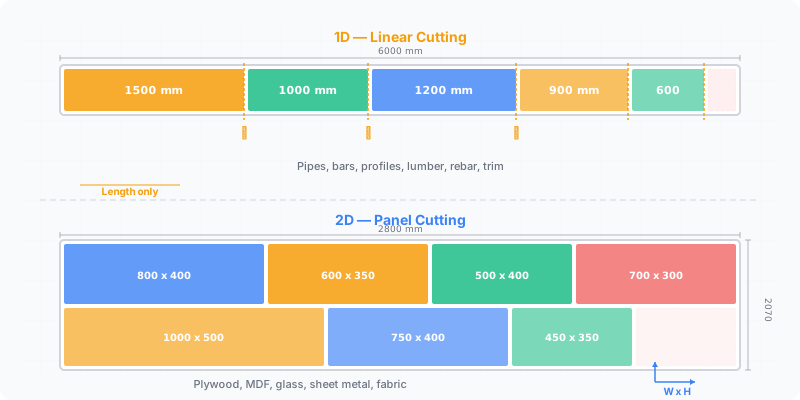
1D optimization cuts lengths from linear stock — bars, pipes, and profiles — where only length matters. 2D optimization nests rectangular parts on flat sheets like plywood, MDF, or glass, where both length and width matter. Use 1D for fixed cross-sections and 2D for panels; CutOptim runs both in one tool.
The dimension you optimize in changes everything about how waste is calculated. Cutting lengths from a steel bar is a fundamentally different problem than nesting rectangles on a plywood sheet. Both fall under “cutting optimization” — formally known as the cutting stock problem — but they use different algorithms, produce different types of waste, and suit different materials. Understanding which category your job falls into determines which tool gives you accurate results.
What this guide covers:
- How 1D optimization works and where it applies
- How 2D optimization handles sheet materials
- Algorithm differences between the two approaches
- A decision guide for selecting the right mode
What Is 1D Cutting Optimization?
One-dimensional cutting optimization arranges parts along a single axis. You have stock of a fixed length, and you need to cut it into shorter pieces with minimal leftover.
Think of it this way: you buy a 6-meter aluminum extrusion and need to cut four pieces at 1,400 mm and one piece at 800 mm. A 1D cutting optimizer figures out how to arrange those lengths on one or more bars so the total drop-off is as small as possible.
Materials that use 1D optimization include steel bars, aluminum profiles, pipes, tubing, lumber boards (when only length matters), curtain rods, trim molding, and rebar. Width and thickness stay constant — the only variable is where you make each crosscut.
The algorithm is a variant of the bin-packing problem, first formalized by Gilmore and Gomory (1961): fit as many lengths as possible into each bar before starting a new one. Kerf width (typically 2-4 mm per cut) gets subtracted at each division point. A 6,000 mm bar with a 3 mm kerf and five cuts loses 15 mm just to sawdust — enough to make or break whether that last piece fits.
What Is 2D Cutting Optimization?
Two-dimensional optimization arranges rectangular parts on a flat sheet. Both the length and the width of each part matter, and the algorithm must position pieces across the entire surface area.
A standard example: you have a 4×8 ft plywood sheet (1,220 × 2,440 mm) and need to cut 15 cabinet panels of varying sizes. The optimizer places each rectangle on the sheet, accounting for kerf between pieces, grain direction constraints, and edge-banding requirements. You can run exactly this kind of job in the free plywood cut calculator.
Sheet materials that require 2D optimization include plywood, MDF, particleboard, melamine, glass panels, sheet metal, acrylic, and composite boards. In Europe, common stock sizes run 2,800 × 2,070 mm; in North America, 4×8 ft (1,220 × 2,440 mm) is the standard.
The underlying algorithm is a two-dimensional bin-packing problem, classified as NP-hard and significantly harder to solve than its 1D cousin. The optimizer must decide not only the sequence but the rotation and spatial position of each piece. Most solvers use guillotine-constrained placement for panel saws, meaning every cut must run edge-to-edge across the remaining section. This mirrors how a real panel saw operates.
dimensions make the problem exponentially harder — 2D cutting has billions more possible arrangements than 1D for the same number of parts
Key Differences at a Glance
| Attribute | 1D Optimization | 2D Optimization |
|---|---|---|
| Material type | Bars, pipes, profiles, linear stock | Sheets, panels, plates, flat stock |
| Dimensions considered | Length only | Length and width |
| Waste type | Drop-off at bar ends | Area waste across sheet surface |
| Typical waste range | 2-8% | 5-20% |
| Algorithm class | 1D bin packing | 2D bin packing / guillotine nesting |
| Grain direction | Not applicable | Optional constraint (lengthwise/widthwise) |
| Rotation | Not applicable | 90-degree rotation often allowed |
| Common machines | Chop saw, band saw, circular saw | Panel saw, beam saw, CNC router |
| Kerf impact | Linear deduction per cut | Deduction on both axes per cut |
Which Do You Need?
Ask yourself two questions:
Does your material have a fixed cross-section? If you’re cutting from bars, tubes, or profiles where the width and height are constant, use 1D optimization. You only care about length.
Are you cutting flat pieces from a sheet? If your parts are rectangles with distinct length and width dimensions — cabinet sides, shelf panels, glass panes — use 2D optimization.
Some jobs involve both. A furniture project might need 2D optimization for the panels and 1D optimization for the aluminum edge banding or steel frame members. Running both modes separately on the same project gives you a complete material plan without mixing up the algorithms.
If your parts are irregular shapes (not rectangles), you need true-shape nesting, which is a specialized subset of 2D optimization typically used with CNC routers, laser cutters, or waterjet machines.
How CutOptim Handles Both
CutOptim supports 1D and 2D optimization in the same interface — use the panel cutting optimizer for sheets and the cut list optimizer for full part lists. Select your mode, enter stock dimensions and part sizes, and the algorithm handles the rest. You can switch between modes without re-entering your material library. Output includes visual diagrams for both — linear layouts for bars, sheet maps for panels — along with waste percentages and cut sequences. The same kerf setting applies to both modes, adjusted for how cuts work in each dimension.
Running a project that mixes linear stock and sheet material? Create two separate optimization runs — one in 1D mode for bars and profiles, one in 2D mode for panels. This keeps the algorithms accurate and gives you distinct cut plans for each material type.
Where Does Timber Fit — Length, or Both?
Length, but with a grouping step first, and that step is why timber deserves treating as its own case rather than as 1D with extra steps.
A sheet job has one stock size and one pile of parts. A timber job has several: 50 × 100 mm and 50 × 150 mm are not interchangeable, so a 2400 mm rail cannot come out of whatever bar happens to be longest — it has to come out of stock with the right cross-section. Before any packing happens, the parts have to be sorted into groups by section, and each group solved against the stock that matches it.
| Linear (1D) | Timber | Sheet (2D) | |
|---|---|---|---|
| What varies on the stock | Length | Length and cross-section | Width and length |
| First question the solver asks | Which bar to open | Which section this part belongs to | Where on the sheet it fits |
| Grouping needed first | No | Yes — one solve per section | No |
| Rotation means anything | No | No | Yes, unless the grain is locked |
| Typical materials | Profile, tube, rebar, trim | Structural and joinery timber | Board, ply, glass, metal sheet |
Getting this wrong is expensive in a specific way: if a tool treats a timber job as plain 1D, it will happily plan a part out of stock that is the wrong section, and the error survives all the way to the yard. Nothing about the numbers looks suspicious — the lengths add up perfectly.
The other consequence is on reporting. A timber job produces a result per section, not one number, and a single overall yield figure across mixed sections is close to meaningless: 90% on the 50 × 100 and 40% on the 50 × 150 does not average into anything you can act on. Look at the sections separately, and buy against the worst one.
There is a purchasing decision hiding in the same place. Because each section is solved independently, adding one part in an unusual section can open a whole new length of stock for a single piece, while the same part in a section you are already buying costs almost nothing. That is worth knowing at design time rather than at the yard: a frame that uses three sections instead of four is often cheaper than one that shaves a few millimetres off each member, and the saving comes from the buying list rather than from the packing.
It also changes what a good result looks like. On a sheet job, yield is the honest headline figure. On a timber job the number that matters is how many lengths of each section you have to buy, because that is what you pay for — and a plan that buys one fewer bar at a slightly worse percentage is the better plan. The free lumber cut calculator works a shed frame through exactly this way, section by section.
Optimize linear and sheet cuts in one tool
Switch between 1D and 2D modes with a single click. No account needed.
Open CutOptim freeFrequently asked questions
What is 1D cutting optimization?
When should I use 2D optimization instead of 1D?
Can I use a 2D optimizer for bars and pipes?
Does 1D optimization handle bars of different lengths in stock?
Which is harder to compute, 1D or 2D?
Related
Ready to optimize your cuts?
2 free runs without an account, then 3 a month with a free account
Open App